The Monday.com Alternative
That Costs $49/mo Flat
Monday.com charges $12 per user, per month. A 10-person team pays $120/month. A 20-person team pays $240/month. Thicket gives you project management with tasks, messages, docs, and timesheets — for one flat price, no matter how many people you add.
$49/month flat. Unlimited users. No per-seat fees.
Free plan available. No credit card required.
Monday.com Gets Expensive Fast
Monday.com's per-seat pricing means your bill grows every time you add a team member, client, or contractor. What starts at $60/month for 5 people becomes $240/month at 20 and $600/month at 50.
Per-seat pricing adds up
Monday.com Standard is $12/user/month. A 20-person team pays $240/month — nearly 5x what Thicket charges for unlimited users.
Every person costs more
Clients, contractors, freelancers — everyone on monday.com is another $12–$19/month. On Thicket, everyone is included.
Key features locked to Pro
Time tracking on monday.com requires the Pro plan at $19/user/month. Thicket includes timesheets on every plan — even the Free plan.
Project Management Without the Complexity
Monday.com gives you boards, automations, dashboards, and dozens of column types to configure. Thicket gives you projects with tasks, messages, docs, and files — ready to use in minutes.
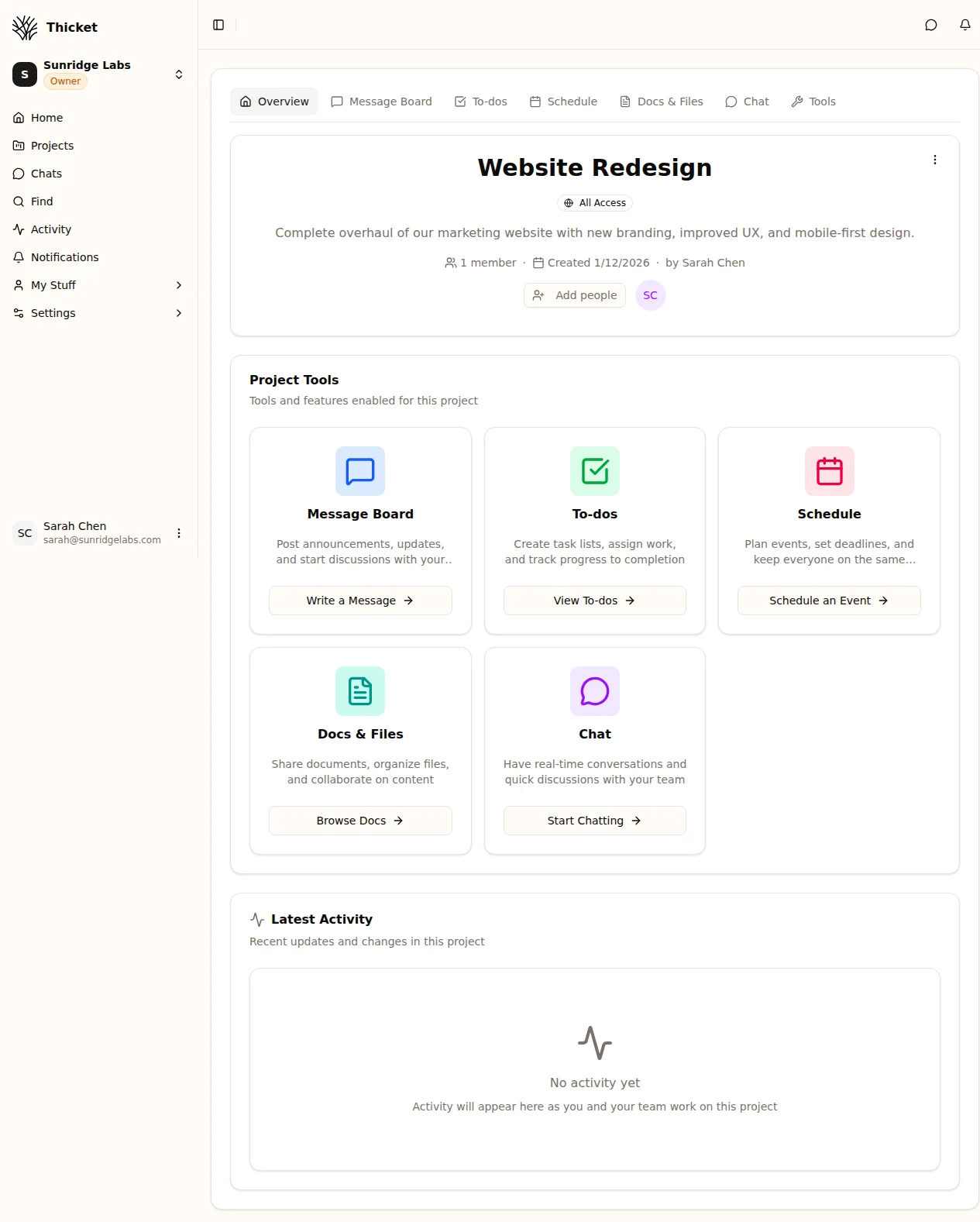
A single project view in Thicket — everything your team needs without the setup overhead of monday.com boards and columns.
Honest Comparison: Thicket vs. Monday.com
Monday.com has more features. Thicket has the features most teams actually use — at a fraction of the cost. Here's an honest look at what each tool does and doesn't do.
| Feature | Thicket | Monday.com | Notes |
|---|---|---|---|
| Task management | |||
| Message boards | Threaded project discussions | ||
| Documents & docs | |||
| File sharing | |||
| Client/guest access | Free in Thicket, extra seats in monday.com | ||
| Schedule & calendar | |||
| Timesheets | Built-in on every plan, not a paid add-on | ||
| Custom forms | |||
| Free plan (5+ users) | Monday.com free plan limited to 2 seats | ||
| Flat pricing (no per-user fees) | |||
| Gantt charts | Not on roadmap — use a dedicated tool | ||
| Automations | We keep it manual and simple | ||
| Custom dashboards | Thicket has project-level activity feeds | ||
| 200+ integrations | Better fit for enterprise workflows |
When monday.com is the better choice
If your team relies on Gantt charts with dependency tracking, workflow automations, custom dashboards, or needs 200+ integrations with other enterprise tools — monday.com is built for that. Thicket is purpose-built for teams that want tasks, docs, messaging, and timesheets without the configuration overhead or per-user pricing. We'd rather you pick the right tool than the wrong one.
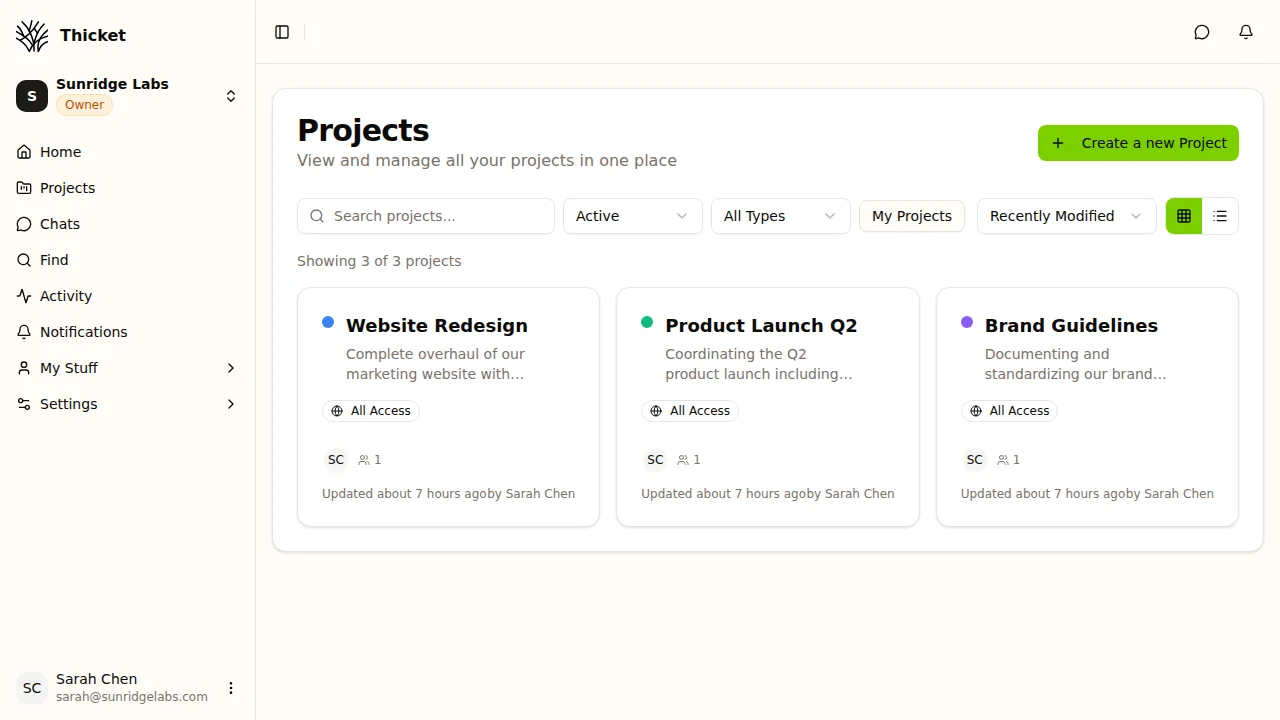
All Your Projects, One View
No boards to configure or views to set up. Thicket shows all your projects in a clean grid with status, members, and recent activity. Find what you need in seconds.
- See project status and team at a glance
- Pin important projects to the top
- No nested folder structures to navigate
The Math Speaks for Itself
Monday.com Standard charges $12/user/month. Monday.com Pro is $19/user/month. Thicket is $49/month flat — no matter how many people you add.
| Team Size | Thicket Pro | Monday Standard$12/user/mo | Monday Pro$19/user/mo | You Savevs Standard |
|---|---|---|---|---|
| 5 users | $49/mo | $60/mo | $95/mo | $11/mo |
| 10 users | $49/mo | $120/mo | $190/mo | $71/mo |
| 20 users | $49/mo | $240/mo | $380/mo | $191/mo |
| 50 users | $49/mo | $600/mo | $950/mo | $551/mo |
$11/mo
saved vs Monday Standard at 5 users
$71/mo
saved vs Monday Standard at 10 users
$191/mo
saved vs Monday Standard at 20 users
Based on monday.com Standard at $12/user/month and Pro at $19/user/month (annual billing). Thicket Pro is $49/month flat for unlimited users.
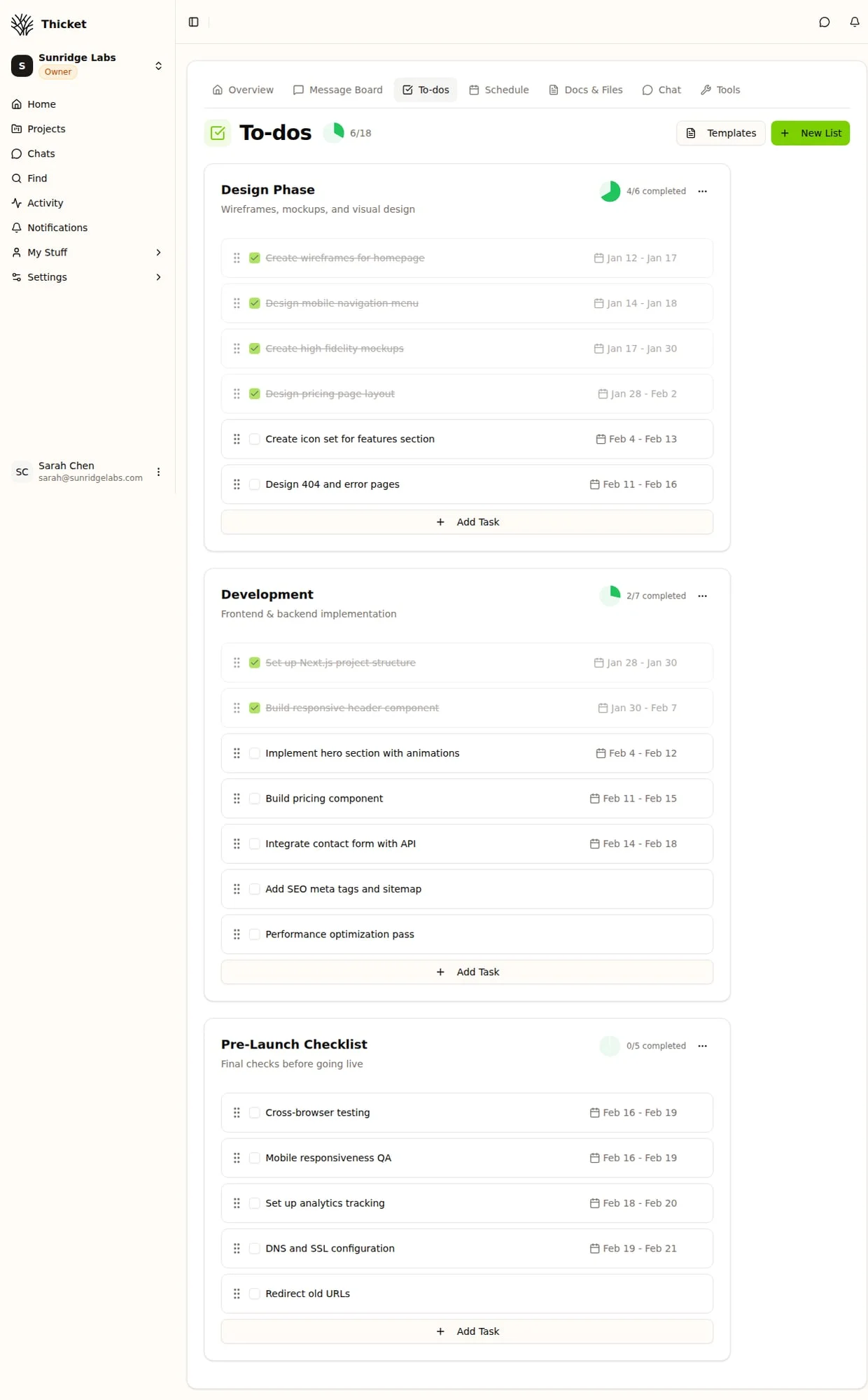
Tasks Without the Board Setup
Create tasks, assign them, set due dates, and track progress. No board configuration, no column setup, no automation rules to define before you can start working.
- Assign tasks to team members instantly
- Due dates, priorities, and progress tracking
- Works on desktop and mobile
Why Teams Switch from Monday.com
The same reasons keep coming up.
Per-seat costs escalate
At $12–$19/user/month, monday.com costs $240–$380/month for a 20-person team. Thicket is $49/month for any team size.
Every guest costs full price
Inviting a client to review a project costs the same as a full-time team member. External collaborators shouldn't cost $12–$19/month each.
Too many features to configure
Boards, columns, automations, integrations, custom fields, views — monday.com requires significant setup. Thicket works out of the box.
Time tracking costs extra
Monday.com only includes time tracking on the Pro plan at $19/user/month. Thicket includes timesheets on every plan, including Free.
No built-in message boards
Monday.com has updates and comments, but no dedicated space for long-form project discussions. Teams end up in Slack or email.
Simpler tool, better value
Teams don't always need automations, Gantt charts, and 200+ integrations. They need tasks, messages, and docs — at a price that doesn't punish growth.
How to Switch from Monday.com
Most teams are fully switched over in a day. Here's the step-by-step process.
Export your monday.com boards
Monday.com lets you export boards as CSV or Excel. Export the boards you want to bring over — tasks, assignments, and due dates come with you. Go to your board, click the three-dot menu, and select Export.
Create your Thicket workspace
Sign up for a free account at thickethq.com. Create projects that match your monday.com boards — most teams have 3-8 active projects. Each monday.com board maps to one Thicket project.
Set up your projects and tasks
Create your task lists and add your active tasks. Focus on what's current — you don't need to migrate completed work. Most teams set this up in 1-2 hours.
Invite your team
Add everyone — team members, clients, contractors. Unlike monday.com, every person is included in your $49/month flat price. No need to calculate per-seat costs or leave anyone out.
Run both tools in parallel
Keep monday.com active while your team ramps up on Thicket. Once everyone's comfortable, cancel monday.com. Most teams fully switch within a week.
Want the full walkthrough?
Our step-by-step Monday.com to Thicket migration guide covers the export path, a full Monday-to-Thicket concept map, team transition tips, and the cost-savings math for 5/10/20/50-person teams.
Switch from monday.com in minutes
If your team wants effective project management without per-seat pricing and board configuration, Thicket is built for you.
30-day money-back guarantee on all paid plans.
$49/month flat — unlimited users, no per-seat fees
14-day free trial of Pro, no credit card required
Projects, tasks, messages, docs, forms, and timesheets
Invite clients and contractors at no extra cost
Common Questions About Switching
How is Thicket different from monday.com?
Both are project management tools with tasks, projects, and team collaboration. The biggest differences: Thicket charges $49/mo flat for unlimited users (monday.com charges $12/user/month on Standard), Thicket includes built-in message boards and timesheets at no extra cost, and Thicket is intentionally simpler — no complex automations or dashboards to configure. Monday.com is built for enterprise teams that need workflow automations, Gantt charts, and integrations. Thicket is built for teams that need tasks, docs, messages, and timesheets without the setup overhead.
How much does Thicket cost compared to monday.com?
Thicket Pro is $49/month flat for unlimited users. Monday.com Standard is $12/user/month — a 10-person team costs $120/month, and a 20-person team costs $240/month. Monday.com Pro is $19/user/month — $190/month for 10 users, $380/month for 20 users. With Thicket, a team of any size pays $49/month. That means a 10-person team saves $71/month vs Monday Standard, and a 20-person team saves $191/month. The savings grow with every person you add.
Can I migrate from monday.com to Thicket?
Yes. Monday.com lets you export boards as CSV or Excel files. You can recreate your workspace in Thicket — create projects, add task lists, and invite your team. Each monday.com board maps to a Thicket project. Focus on migrating active work rather than historical data. Most teams complete the migration in a day. Our full step-by-step Monday.com to Thicket migration guide at thickethq.com/guides/migrate-from-monday walks through the export path, a complete concept map (board → project, item → task), and team transition tips.
Does Thicket have a free plan?
Yes. The Free plan includes 3 projects, 5 team members, and 1GB storage. No credit card required. Monday.com's free plan is limited to 2 seats with restricted features. Thicket's Pro plan at $49/month unlocks unlimited projects, unlimited users, and unlimited storage with a 14-day free trial.
Does Thicket have automations like monday.com?
No. Thicket is intentionally simpler — we focus on the core project management features most teams actually use: tasks, messages, docs, forms, and timesheets. If you rely heavily on workflow automations, custom dashboards, or complex integrations, monday.com may be a better fit. But if you want effective project management without per-seat costs or configuration overhead, Thicket is built for you.
Can I invite clients and contractors without extra cost?
Yes. Thicket Pro includes unlimited users — team members, clients, contractors, and freelancers are all included at no extra charge. On monday.com, every person you add is another $12–$19/month. This makes Thicket especially cost-effective for agencies, consultancies, and teams that regularly collaborate with external partners.
What does Thicket have that monday.com doesn't?
Thicket includes built-in message boards for long-form team discussions, timesheets for time tracking and reporting, and flat pricing with no per-user fees. Monday.com charges per seat, doesn't have dedicated message boards for threaded project discussions, and time tracking is only available on the Pro plan ($19/user/month) and above. Thicket also includes custom forms for intake and requests on every plan.
Is Thicket good for teams that currently use monday.com for time tracking?
Yes. If you're on monday.com Pro ($19/user/month) specifically for time tracking, Thicket is a significant cost saving. Thicket includes timesheets on every plan — even the Free plan. You get time logging, timesheet reports, and project-level time tracking built in. A 10-person team on monday.com Pro paying $190/month for time tracking can switch to Thicket at $49/month and save $141/month while keeping the same functionality.
Does monday.com charge for guests and viewers?
On monday.com's Standard and Pro plans, guests count as full paid seats. If you invite a client to view a single board, they're billed at the same rate as a full-time team member — $12–$19/month. On Thicket, there's no distinction. Everyone — team members, clients, contractors, part-time contributors — is included in the $49/month flat price.
How long does it take to set up Thicket?
Most teams are up and running in under 30 minutes. Create an account, set up your first project, add your task lists, and invite your team. There's no board configuration, no column setup, and no automation rules to define before you can start. Compare this to monday.com, where a new workspace typically takes several hours to configure properly — setting up boards, choosing column types, building views, and configuring automations for each workflow.
Project management shouldn't cost $12 per person
Thicket is $49/mo flat for unlimited users. Free plan available. No credit card needed to start.